
Introduction
PlayZo helps brands & educators build highly engaging games to drive quality engagement that drives meaningful action. This next-gen marketing solution allows businesses of all sizes to design and publish branded games without any coding knowledge. In this article, we will explore how to create a game on PlayZo and the various features that make it a powerful tool for boosting customer engagement & sales.
PlayZo stands out as the ultimate platform for creating high-quality games. With its extensive library of game templates, complete customization options, and intuitive tools, you can design, edit, and publish fully personalized games within minutes. Whether for marketing or education, PlayZo ensures a seamless experience tailored to your vision
Getting Started with PlayZo
Once you log into the PlayZo dashboard, you can access a diverse library of nearly 40 interactive game templates. These templates cater to a variety of needs and include:
- Advanced Quizzes: Fully customizable with timers, explanations, and video integration.
- Arcade-Style Games: Skill-based and highly addictive games designed to maximize engagement.
- Luck-Based Games: Perfect for contests and giveaways.
- Text-Based & Puzzle Games: Ideal for storytelling and cognitive engagement.
- Sign-Up Forms & Landing Pages: Simplified, gamified tools for lead collection.
PlayZo also introduces 2–3 new games each month, ensuring your options remain fresh and innovative. With PlayZo, you have everything you need to create interactive, gamified content—no other platform is required.
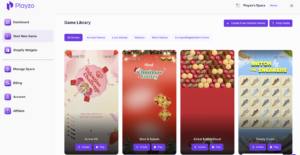
Choose a Game Template
To get started, select the game template that best suits your needs by clicking “Create.” Name your project, and you’re ready to start customizing. For this guide, we’ll use the popular Knife Ninja game as an example.
Customizing Your Game
Game Preview & Editor
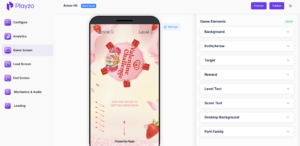
Upon opening a game, you’ll land on the Game Screen Tab, where you’ll find a Live Interactive Preview of your game. This real-time preview allows you to:
- Instantly see the effects of your changes.
- Playtest the game while editing to streamline the customization process.
- If for any reason changes are not reflecting, just click on “Refresh” icon just besides the game
Unparalleled Customization Features
What sets PlayZo apart is its depth of customization capabilities. Unlike other platforms with restrictive styling options, PlayZo provides full creative freedom to align every detail of your game with your brand aesthetics.
Customizing Game Assets
From the intuitive right-hand panel, you can easily:
- Set Backgrounds: Change the game’s backdrop under the Background Tab. Be wary to have an image of optimal size. Too big size images can hamper the gaming experience.
- Modify Visuals: Update visuals for game elements such as arrows, spinning wheels, and other assets. Be sure that you remove any background behind the images
- Resize & Reposition Elements: Adjust the size and placement of assets to fit your design perfectly
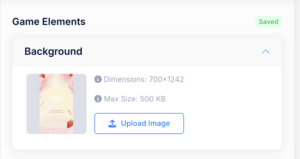
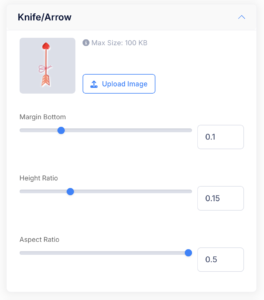
For instance, in Knife Ninja, you can customize the visuals, size, and positions of the arrows and spinning wheels to reflect your unique style.
Text Formatting & Localization
- Edit Text Elements: Customize level text, score displays, or instructions by adjusting font size, color, and placement.
- Localization: Translate all game text into your preferred language, ensuring your game resonates with a global audience.
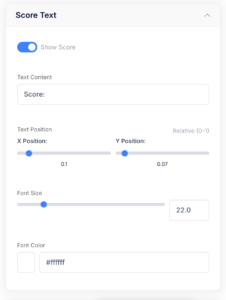
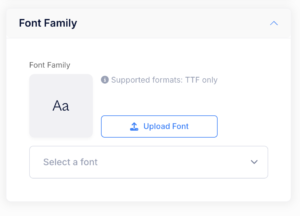
Font Style Customization
Choose from built-in fonts, or upload your own custom font (in TTF format) to maintain brand consistency throughout your game.
Next Steps: Post-Game & Lead Collection
Once your game is fully customized, you can enhance engagement by leveraging PlayZo’s additional features:
- Post-Game Screen: Create a compelling screen to encourage players to take key actions, such as visiting your product page, redeeming rewards, or replaying the game.
- Lead Collection Flow: Add an optional lead generation step directly within the game flow to capture valuable user information seamlessly.